
July 2026
How to Redeem Codes in Tattoo Studio Tycoon
Redeeming codes in Tattoo Studio Tycoon takes less than a minute once you know where the menu lives, but new players often search the settings panel or shop first and come up empty. Codes are entered through a dedicated promo field inside the game rather than the Roblox platform itself, which means you must be loaded into the studio world before typing anything. This guide walks through the full process on every major platform, covers common input mistakes, and explains what success and failure messages look like. Whether you are claiming CLEANLINES for your first 10,000 cash or sweeping all twelve active codes for 120,000 total, the steps are identical. Read through once, keep the code list open in another tab, and you can redeem the entire set in a single visit without restarting the server.
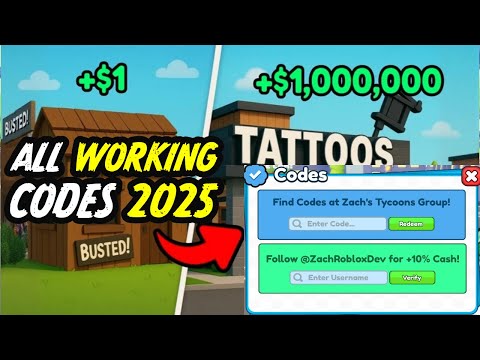
Step-by-Step Redemption Process
Launch Tattoo Studio Tycoon from the official Roblox game page using place ID 133597448044458. Wait until your character spawns inside your studio plot and the main HUD finishes loading. Look for the Codes button, usually placed along the side or top UI bar depending on the current interface theme.
Tap or click Codes to open the text field. Type or paste one code exactly as published, then confirm. A success notification appears and cash is added instantly to your balance. Close the window and repeat for the next code. Redeem one at a time so you can tell which string failed if an error pops up.
- Open the game from the official Roblox page.
- Wait for your studio to fully load.
- Press the Codes button on the HUD.
- Enter the promo string and submit.
- Repeat for each unused code.
Redeeming on PC, Mobile, and Console
On PC, click the Codes button with your mouse and type on the keyboard. Copy-paste from this wiki works in most Roblox clients, which helps avoid typos on longer strings like MoreUpdatesSoon or NEWPLOTSSOON.
Mobile players tap the same Codes button, then use the on-screen keyboard. Console players navigate to the button with a gamepad cursor and use the virtual keyboard. All platforms share one account-wide save, so codes redeemed on phone apply to PC sessions and vice versa.
Typing Codes Correctly
Most codes mix uppercase letters and occasional lowercase segments such as May23UPD or TattooInk. Enter them exactly as listed on our active codes page. Extra spaces before or after the string are a frequent cause of invalid code errors.
If paste fails on console, type slowly and double-check characters that look alike, such as zero versus letter O. Roblox filters do not block these promo strings, so profanity warnings should not appear for legitimate codes.
After You Redeem
Cash from codes spends like normal earnings. Buy stations, unlock designs, or save toward rebirth depending on your goals. Codes never grant premium currency or exclusive cars directly; they only add flat cash amounts.
Track redeemed codes mentally or with our code calculator so you do not retry the same string. Failed already-redeemed attempts sometimes confuse players into thinking a code expired when it is still active for others.
Redemption Workflow for Busy Sessions
Speed redemption by opening this wiki on a second device while the game loads on your main screen. Read codes aloud or paste them one at a time without alt-tabbing if your client pauses when losing focus. Console players benefit from photographing the active list rather than squinting at tiny virtual keys.
After redeeming, spend at least a portion immediately on income upgrades so the boost feels tangible. Players who redeem everything but log off before purchasing stations sometimes forget how much cash they had when they return days later mid-rebuild.
Teaching younger players to redeem safely means emphasizing official menus only. Never enter codes on browser forms pretending to connect to Roblox servers outside the actual game client.
Family and Shared Device Tips
Households sharing one tablet should confirm which Roblox profile is active before redeeming because codes attach to the logged-in account instantly. Log out between siblings to prevent accidental redemption on the wrong avatar. Parents can create a simple checklist taped near the device listing each child account and which codes they already claimed this month.
School networks sometimes block Roblox entirely, making redemption homework for home hours. Plan code entry sessions when Wi-Fi is stable rather than during bus rides with dropping connections that interrupt submit buttons mid-request.
If redemption succeeds but cash seems missing, open the shop and attempt a small purchase to force UI refresh before filing false bug reports. Visual lag hides updated balances occasionally on low-end hardware.
Bookmark this page and the active codes list together so future update weekends require only two tabs. Older players returning after breaks benefit from ordered lists more than scattered social bookmarks.
Related Guides
Frequently Asked Questions
Where is the code button in Tattoo Studio Tycoon?
Look on the main HUD for a Codes button after your studio loads. It is not inside Roblox settings or the avatar shop.
Can I redeem the same code twice?
No. Each code is one-time per account. A second attempt shows an error even if the code remains active for other players.
Do codes work in private servers?
Yes, in most cases promo redemption works in private servers as long as you are in the official game place.
How much cash do all codes give combined?
Twelve active codes at 10,000 each equal 120,000 total cash when you redeem every available string once.